
Summary
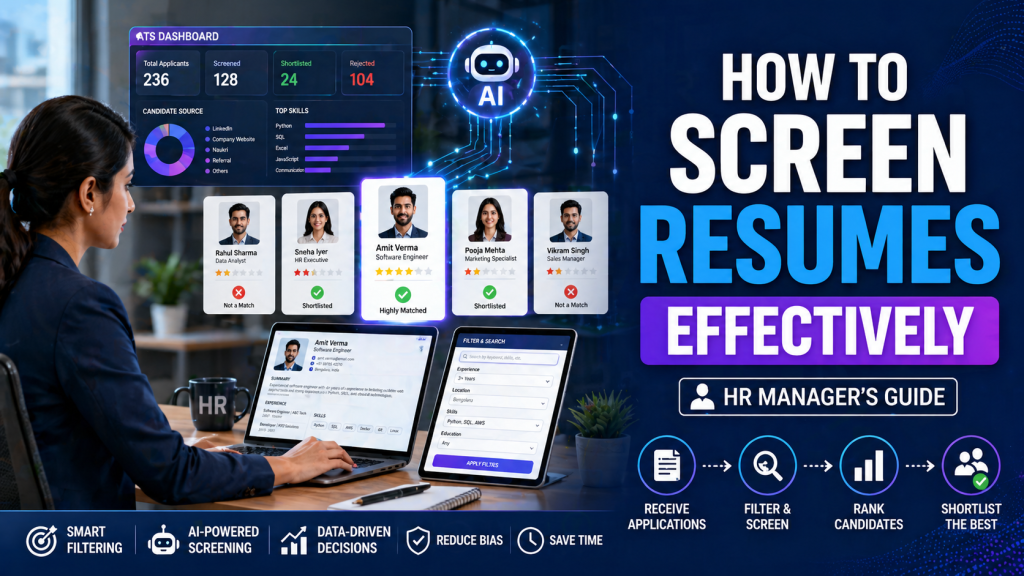
Knowing how to screen resumes efficiently helps HR managers identify the right candidates faster while reducing hiring errors. This guide explains a practical, step-by-step resume screening process, including how to evaluate skills, filter candidates from job portals, and use AI tools effectively. It also covers time benchmarks, technical screening methods, and common mistakes to avoid. Whether you are hiring for entry-level or technical roles, this guide provides clear, real-world strategies to improve candidate shortlisting and streamline your recruitment workflow using platforms like JobVumi.
Introduction
Resume screening is often the most time-consuming part of hiring, yet it directly impacts the quality of candidates you interview. Many recruiters struggle with large volumes of applications, inconsistent evaluation methods, and unclear criteria.
Understanding how to screen candidates resumes properly allows HR teams to reduce bias, improve hiring speed, and focus only on relevant profiles. This guide breaks down a structured approach that works across industries and experience levels.
What Is Resume Screening?
Resume screening is the process of reviewing candidate resumes to identify individuals who match the job requirements based on skills, experience, education, and overall fit.
It helps recruiters:
- Filter out unqualified applicants
- Identify strong candidates quickly
- Prioritize interviews efficiently
- Reduce hiring time and cost
Screening can be done manually or with tools like ATS (Applicant Tracking Systems) and AI-based filters.
Also Read:
- How to Write an ATS based Resume in 2026?
- How to Write a Resume for Freshers in India 2026 – Step-by-Step Guide
How to Screen Resumes Step-by-Step
1. Define Clear Screening Criteria
Start by setting clear requirements before reviewing resumes.
Include:
- Required skills and tools
- Minimum experience level
- Education or certifications (if necessary)
- Location or availability
Without clear criteria, screening becomes inconsistent and subjective.
2. Scan for Basic Eligibility (10–15 Seconds)
The first pass should be quick. Spend 10–15 seconds per resume.
Check:
- Job title relevance
- Years of experience
- Location match
- Basic qualification
This step helps eliminate clearly irrelevant applications.
3. Check Skills and Experience Alignment
Now evaluate how closely the candidate matches the role.
Focus on:
- Relevant tools and technologies
- Industry experience
- Role-specific achievements
- Project exposure
Avoid relying only on keywords—look for actual application of skills.
4. Look for Red Flags
Certain patterns may indicate risk.
Common red flags include:
- Frequent job changes without reason
- Unexplained employment gaps
- Generic or copied resumes
- Lack of measurable achievements
These don’t always mean rejection but require further validation.
5. Shortlist and Rank Candidates
Group candidates into categories:
- Strong fit (ready for interview)
- Moderate fit (requires evaluation)
- Low fit (reject)
Ranking helps prioritize interviews and saves time during later stages.
How to Screen Resumes from Job Portals
When screening resumes from platforms, volume is high and filtering is critical.
Effective approach:
- Use filters (location, experience, skills)
- Sort by relevance or recent activity
- Scan top profiles first
- Save shortlisted candidates for follow-up
Platforms like JobVumi simplify this by offering structured candidate data and skill-based filtering.
How Much Time Takes to Screen a Resume?
On average:
- Initial screening: 10–30 seconds per resume
- Detailed review: 2–3 minutes per shortlisted resume
For bulk hiring, recruiters often rely on quick scanning followed by deeper evaluation only for selected profiles.
How Much Time Takes to Screen a Resume Through ATS?
Using an ATS reduces manual effort significantly.
Typical time:
- Automated filtering: instant
- Human review after ATS: 15–60 seconds
ATS tools pre-filter resumes based on keywords, experience, and criteria, allowing recruiters to focus on quality candidates.
How to Do Technical Screening of Resume
Technical roles require deeper evaluation beyond surface-level skills.
1. Focus on Real Skills
Check for:
- Specific tools used (e.g., Python, SQL, React)
- Technologies applied in projects
- Certifications or training
2. Evaluate Practical Experience
Look for:
- Real-world projects
- Internships or freelance work
- Problem-solving examples
Experience matters more than theoretical knowledge.
3. Look for Depth, Not Just Keywords
A resume listing many skills without examples may indicate low expertise.
Strong candidates usually:
- Explain project roles clearly
- Mention outcomes or results
- Show consistency in a skill area
How to Use AI in Screening the Resumes
AI tools can speed up and improve screening accuracy.
Practical Use Cases
- Resume parsing and data extraction
- Keyword-based filtering
- Candidate ranking based on job fit
- Duplicate profile detection
- Skill matching across large datasets
Important Tip
AI should support, not replace, human judgment. Always review top candidates manually to ensure contextual accuracy.
How to Screen Resume from Job Portals Efficiently
To improve efficiency:
- Apply advanced filters before opening resumes
- Review profiles in batches
- Use tagging or notes for shortlisted candidates
- Avoid re-checking already rejected profiles
Consistency in workflow reduces screening time significantly.
How to Pass Resume Screening (From a Candidate Perspective)
Candidates can improve their chances by:
- Tailoring resumes to the job description
- Highlighting relevant skills first
- Adding measurable achievements
- Avoiding unnecessary information
- Using clear formatting
A focused and role-specific resume is more likely to pass screening quickly.
Common Resume Screening Mistakes to Avoid
Recruiters often make avoidable errors during screening.
Key mistakes include:
- Relying only on keywords without context
- Ignoring transferable skills
- Rejecting candidates too quickly
- Inconsistent evaluation criteria
- Overlooking potential due to formatting issues
Structured evaluation reduces these errors.
Practical Example of Resume Screening
For a digital marketing role:
Step 1: Filter candidates with 1–3 years experience
Step 2: Check for skills like SEO, Google Ads, analytics
Step 3: Review projects (campaign results, traffic growth)
Step 4: Shortlist candidates with measurable outcomes
Step 5: Rank based on relevance and performance
This approach ensures objective and efficient screening.
Key Takeaways for HR Managers
- Define clear criteria before screening
- Use quick scanning to filter large volumes
- Evaluate skills based on real experience
- Combine ATS tools with manual review
- Maintain consistency in evaluation
- Focus on quality over quantity
Final Thoughts
Effective resume screening is not about reading every resume in detail—it’s about identifying the right signals quickly. A structured process, combined with smart use of tools and clear evaluation criteria, helps recruiters make better hiring decisions.
Platforms like JobVumi further simplify this process by organizing candidate data and improving search accuracy. With the right approach, HR managers can reduce hiring time while improving candidate quality.
Frequently Asked Questions (FAQs)
How to screen resumes quickly?
Start with a 10–15 second scan for basic eligibility, then review shortlisted resumes in detail. Use filters and tools to reduce manual effort.
How to screen resumes from job portals effectively?
Use advanced filters, sort by relevance, and review top candidates first. Focus on profiles that closely match job requirements.
How much time should be spent on resume screening?
Initial screening takes 10–30 seconds per resume, while detailed evaluation takes 2–3 minutes for shortlisted candidates.
What is the best way to do technical resume screening?
Focus on real projects, tools used, and measurable outcomes rather than just listed skills.
Can AI replace resume screening?
AI can automate filtering and ranking, but human review is essential for final decisions.
What are common resume screening mistakes?
Over-reliance on keywords, inconsistent criteria, and ignoring transferable skills are common mistakes.
How can candidates pass resume screening easily?
Candidates should tailor resumes, highlight relevant skills, and include measurable achievements aligned with the job role.
